Introduction
What is C#?
C# (C-Sharp) is a popular, modern programming language made by Microsoft. It is designed to be safe, easy to read, and powerful.
Think of C# as the written language (like English). You use it to write instructions that tell a computer what to do. Today, C# is completely free and cross-platform, meaning you can use it to build apps for Windows, Mac, Linux, iPhones, and Android phone
The .NET Ecosystem
If C# is the language, .NET is the entire toolset and workshop where you use that language. You cannot run C# without .NET.
Over the years, .NET has evolved:
Old Way (.NET Framework): It only worked on Windows computers.
Modern Way (.NET Core / .NET 10): A brand new version built from scratch. It is incredibly fast and works on any computer (Windows, Mac, or Linux). .NET 10 is the latest, most powerful version of this toolset.
When you download .NET, you get:
The SDK (Software Development Kit): The tools you need to write and build your code.
The Runtime: The engine needed to run the app on a computer.
The Library: A collection of thousands of pre-written codes (like a dictionary of functions) so you don't have to code common tasks—like saving a file or calculating numbers—from scratch.
The Common Language Runtime (CLR)
The Common Language Runtime (CLR) is the most important part of .NET. It acts like a virtual supervisor that manages your program while it runs.
When you run a C# program, it does not instantly talk to the computer's processor. Instead, it goes through a two-step process:
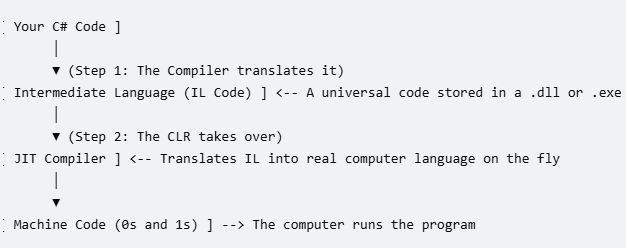
Step 1: The .NET tools translate your C# code into a middle-ground language called Intermediate Language (IL). This is a universal code that can be moved to any computer.
When you download .NET, you get:
Step 2: When you double-click the app to run it, the CLR takes that universal code and uses a tool called the JIT (Just-In-Time) Compiler to translate it into the exact language (0s and 1s) that your specific computer's brain understands.
What else does the CLR do?
While your program is running, the CLR watches over it like a bodyguard to keep it stable:
Garbage Collection: It automatically cleans up the computer's memory. When your app stops using data, the CLR throws it away so your computer doesn't slow down
Error Handling: If something goes wrong (like trying to open a file that doesn't exist), the CLR catches the error so the app doesn't crash instantly.
Security: It checks the code to make sure it isn't doing anything dangerous or unauthorized to the computer.
class Program
{
static void Main()
{
Console.WriteLine("Hello, World!");
}
}
💻 Interactive Code Editor
C# (.NET)Feel free to change the message string inside the quotes and run it to watch your results update instantly.
Terminal Output Console:
Click "Run Code" above to check execution output logs...